all things linux

  • Subscribe to our RSS feed.
  • Twitter
  • StumbleUpon
  • Reddit
  • Facebook
  • Digg

Sunday, 3 August 2014

Installing MATE as an Afterthought: How to avoid icon clutter and set the desktop to $HOME/Desktop?

Posted on 06:42 by clener
Hi all, I've been rather busy with non-tech related stuff, completing my dissertation and writing an article for a journal so apologies for the very infrequent postings. However, we've got a small update today. You might have come across the same problem when adding the MATE desktop environment to a pre-existing install, instead of just using Point Linux or the Salix Mate spin which already come all set up for you and polished. If you install yourself, small niggles may remain.

The problem is that on my Debian Openbox that started out as CrunchBang the entire contents of the home folder was visible on the desktop, with icons taking up most of it. Not being able to see our beautiful wallpapers is clearly unacceptable. I thought it might be a Dconf setting but was unable to find it. As often though, the solution is quite simple and only an internet search away if you type in the right key words. In this case the answer was on AskUbuntu.

Basically, we need to edit the hidden file ~/.config/user-dirs.dirs. As is stated there, change the entry for XDG_DESKTOP_DIR to your new desktop folder, or add it, if the entry does not exist. In Crunchbang, and possibly any straight and vanilla Debian install, this entry reads

XDG_DESKTOP_DIR="$HOME"

Change it to

XDG_DESKTOP_DIR="$HOME/Desktop".

In Crunchbang/Debian and probably most vanilla distributions the directories are all set to "$HOME". As set out on AskUbuntu, you may wish to change all directories to their special folders.

XDG_DESKTOP_DIR="$HOME/Desktop"
XDG_DOWNLOAD_DIR="$HOME/Download"
XDG_TEMPLATES_DIR="$HOME/Templates"
XDG_PUBLICSHARE_DIR="$HOME/Public"
XDG_DOCUMENTS_DIR="$HOME/Documents"
XDG_MUSIC_DIR="$HOME/Music"
XDG_PICTURES_DIR="$HOME/Pictures"
XDG_VIDEOS_DIR="$HOME/Videos"`

A simple log out and back in again as stated there did not suffice and resulted in an infinite spawning of minimized windows on the panel, making the system unresponsive. The solution is to shut down and reboot for a clean start and all was fine. This is the result. I didn't know I liked GNOME 2 that much. It's been a long time since 2006.

The NOX Gtk 2 theme employed and AlaDelta window border scheme are in the Debian repos, OSX-Nostalgie-1.2.4 icons are from gnome-look.org.


As I can't recall where I got the background from I'll consider uploading it if anybody should request it.

Edit: Added a screenshot because we're all visual beings. Removed the link to forum post and added theming details.
Read More
Posted in crunchbang, debian, desktop, how-to, mate | No comments

Thursday, 29 May 2014

Overclockix Revived: Debian-based Distro Nostalgia

Posted on 03:51 by clener
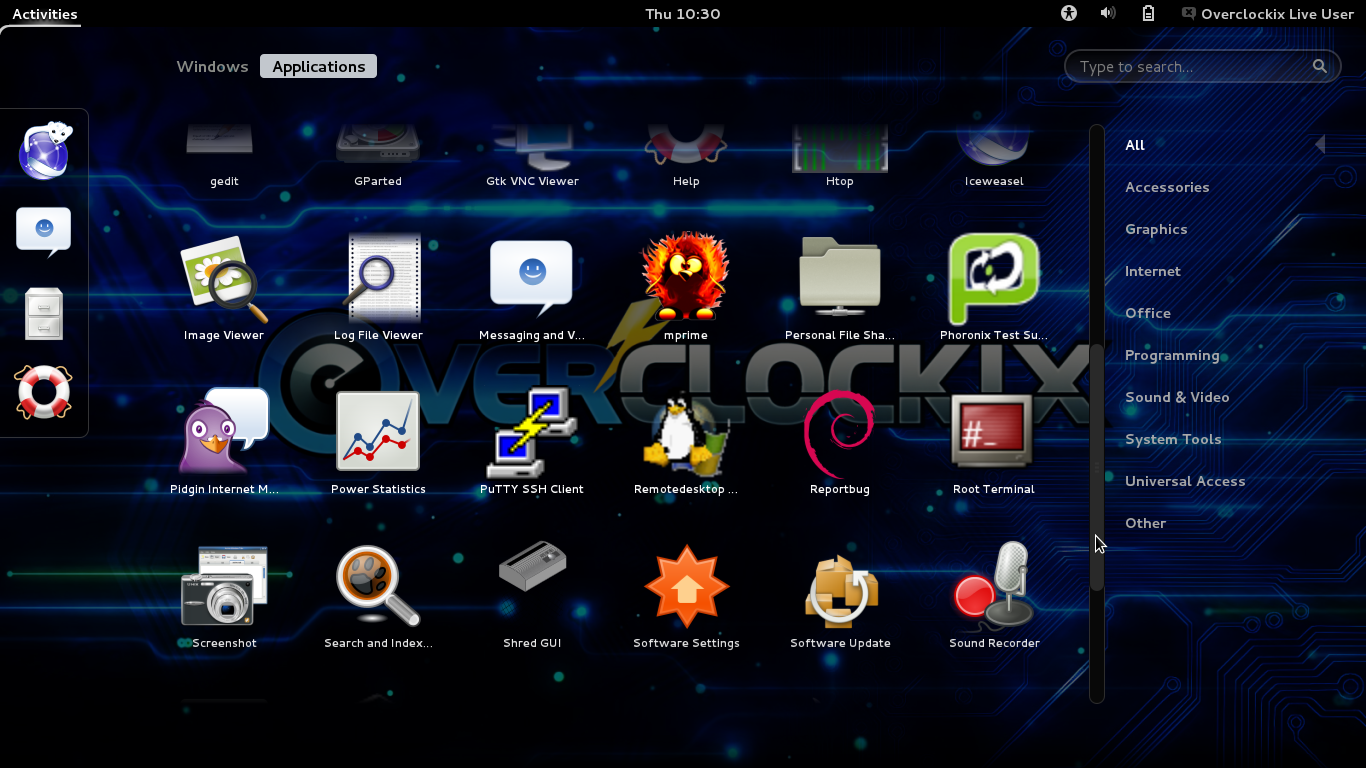
Overclockix, like KNOPPIX STD (remember that one?), is one of those rare use specialist distributions that will always prevent it from widespread adoption, but that's not the point. It was discontinued in 2005 and has recently been revived by several enthusiasts on the Overclockers forum. Read the full announcement here. Back then it was built around the KDE 3 desktop, but the new development team have held a poll where Gnome Shell came out top as preferred environment.

As Overclockix is based on Debian (stable) this means we get GS 3.4 at the moment, a relatively early release still lacking many features.
The download is quite small, under CD size, and the distribution comes with some neat tools you'll be hard pressed to find anywhere else by default. At this point it's probably a good idea to link to their main page so you can have a look around in another tab and download the latest file. It seems like they're starting their version numbering from scratch as the current release is 018. Overclockix is available for i386 and AMD64 as direct download, torrent and magnet links. I used the torrent and the download completed in only around 10 minutes.

Images are available in hybrid-iso format to burn to CD or use on a USB stick and as img files which allows for persistent storage after they have been written to memory stick or hdd and for creation and modification of partitions. Click here to see how to do this. The forum thread is really informative and acts as a sort of manual, all the important steps, including how to join the team and getting involved in Overclockix. I wrote the iso image to USB with mintstick which had been added to a modified CrunchBang 'Waldorf' install that is rolling with Debian Unstable/Sid. No problems here and soon I was able to boot into it. The password for the live user is 'live' and the root account can be accessed with 'sudo su -'.


As indicated before we get  a barren Gnome Shell 3.4 without anything in the way of tweaks or extensions, not even Gnome Tweak Tool is installed. Truth be told, this is probably enough for a working environment you only boot up once in a while to make use of the tools included here, but so is Openbox. Although I'm slowly warming to the Shell a bit and the possibility of getting around all by keyboard similar to Openbox, I can't see the point of switching to get something I already have. The provision of a graphical interface to Google Drive via the online accounts feature is pretty nice though. Anyway, GS 3.4 will be fine for the occasional use. If your graphics hardware is not supported, like when trying it out in VirtualBox, you'll be dropped into the fallback mode which, I'm sure you know, looks a lot like its predecessor but is more restricted.

There are a couple of tools included here like system profiler for hardware detection and to list sensors and the like, power statistics, Putty SSH and a remote desktop viewer and the BOINC distributed service manager, a tradition carried over from the old distro days. However, the real heart of the distributions seems to be the inclusion of the Phoronix test suite and I believe some overclocking utilities for graphics cards. Overclockix performed well on my measly testing laptop with an AMD dual-core E-350 at 1.6 GHz, an AMD Radeon HD 6310 and three Gigs of memory and the Shell was responsive overall, with a slight delay in the beginning and when launching the Applications overlay. It was utterly fast running on my Acer AMD Phenom II X3 with 2.1 GHz and a ATI Mobility Radeon HD 4250. Unfortunately the network was not accessible. Trying to start it resulted in the error that "system network services are not compatible with this version" on both laptops.

Get the img and iso files here and take it for a spin.
Read More
Posted in debian, desktop, distributions, gnome shell, live medium, overclockix, specialist | No comments

Wednesday, 28 May 2014

Siduction 'Paintitblack' LXQt Dev Release: Screenshots

Posted on 11:25 by clener
Earlier this month the Siduction team, which regularly updates snapshots based on Debian Unstable/Sid, released a development build showcasing the new LXQt desktop, the future of both the LXDE and the Razor-qt environments. Siduction have a bit of history here as they featured Razor-qt as a desktop early on and were probably the only distribution to ship a dedicated iso as part of their line-up throughout 2012 and 2013. Besides using KDE 4 for the main image Siduction have shown a great commitment to medium light and lower resource desktops.
Read more here >>
Read More
Posted in debian, desktop, live medium, lxde, lxqt, qt, screenshots, siduction | No comments

Saturday, 18 January 2014

Fastidious Elegance - Slackware 14.1: Why take a closer look?

Posted on 14:49 by clener
Today I would just like to link to another Slackware user's blog. Aaron W. Hsu has written a review that is slightly different from recounting the usual installation and which applications are included routine. Entitled "Slackware 14.1: Why take a closer look?" it's definitely worth a read for anybody interested in running Linux at all, even if in the end they decide against it.
Read More
Posted in distributions, reviews, slackware | No comments

Sunday, 17 November 2013

AntiX 13.2 - More Modern But Still Some Quirks

Posted on 16:30 by clener
Blimey, it's been a long time since I reviewed antiX already and it's about time to give it a second look. The overall judgement may have been a bit harsh last time around and I'm going to see whether we can write a more positive piece this time. Some of the issues raised seems were valid though as the distribution has changed a bit since then. Enough of that, let's hop right in.
Read more here >>
Read More
Posted in antiX, debian, desktop, distributions, fluxbox, icewm, jwm, live medium, reviews | No comments

Tuesday, 12 November 2013

How To Uninstall McAfee Antivirus - By John McAfee

Posted on 16:33 by clener
This vid is not fit for work due to strong language and more. Offensive and extremely funny. We all remember our first Antivirus, don't we?
Read More
Posted in video | No comments

Circumventing Censorship with BitTorrent and Anonymizer Proxies

Posted on 16:30 by clener
After P2P clients like Limewire using the Gnutella network among others have been shut down the emphasis seems increasingly on BitTorrent and the sites hosting torrents. Where sites are not shut down like Isohunt recently they get blocked from access by the major ISP's. A futile exercise as sites are simply resurrected, renamed or proxied using a different domain extension and it proves impossible to shut them all down. Go to http://torrentproxies.com/.
Read more here >>
Read More
Posted in anonymity, bittorrent, proxy, tor | No comments
Older Posts Home
Subscribe to: Comments (Atom)

Popular Posts

  • Installing MATE as an Afterthought: How to avoid icon clutter and set the desktop to $HOME/Desktop?
    Hi all, I've been rather busy with non-tech related stuff, completing my dissertation and writing an article for a journal so apologies ...
  • Article re. Slax is out on Distrowatch.com
    My article about the Slax community remix is out as this week's feature story on Distrowatch. I've been wanting to write about Slax ...
  • Slackel, Custom Slackware Current with Newest KDE 4
    Just a few days ago I was writing about getting a newer version of KDE 4 with Porteus or from Eric Hameleers' Ktown repository, and I h...
  • A Tinkerers Top 5 Distributions of 2010
    In the last few days we've had several posts about personal top 5 favorite distributions of 2010. Everybody has their own favorites, but...
  • Fedora 19 - Of Schroedingers Cat and Mixed Blessings
    Fedora is one of those distributions I try from time to time but that ultimately fail to stay around, usually when it comes to the upgrade ...
  • How to get Ralink 2870 wireless USB adapter working in SalixOS/Slackware-13.1
    This one has taken me quite a while to find out, with bits of information here and there. Two steps only: Blacklist rt2800usb in your /etc/m...
  • Installing Fedora 19
    For the release of Fedora 18 the installation tool was completely overhauled, which also resulted in a different layout to the former Anacon...
  • What's the matter with Firefox these days?
    Not long ago I was still defending Firefox as a good browser that never, or only very rarely like every few months, crashed on me. That may ...
  • Chakra GNU/Linux - Interview with the Development Team
    Every once in a while you come across a distribution that makes you re-evaluate your preferences and challenges your perception of what the ...
  • Absolute Linux 14.0 - Still Needs Refinement
    I haven't upgraded to Slackware 14 yet and in a moment of madness obliterated my old install to start all afresh. That leaves some room ...

Categories

  • 12.04 LTS
  • 1280x1024
  • 14.1
  • absolute
  • accessibility
  • administration
  • afterstep
  • android
  • announcements
  • anonymity
  • anonymous
  • antiX
  • applications
  • arch
  • archbang
  • archone
  • authentication
  • bash
  • bittorrent
  • bodhi
  • books
  • browsers
  • browsing
  • bsd
  • bug
  • bugs
  • calculate
  • centos
  • certification
  • chakra
  • chatzilla
  • chromium
  • click
  • commodore 64
  • crunchbang
  • crux
  • ctkarch
  • debian
  • desktop
  • digital certificates
  • distributions
  • documentaries
  • documentation
  • drivers
  • e17
  • encryption
  • enlightenment
  • events
  • fake
  • fedora
  • firefox
  • flash
  • fluxbox
  • fluxflux
  • FPS
  • free software
  • frugalware
  • FSF
  • fusion
  • fvwm
  • fvwm-crystal
  • games
  • gaming
  • gentoo
  • gnome
  • gnome shell
  • gnu/linux
  • google-chrome
  • graphics
  • grml
  • hardcore punk
  • hardware
  • how-to
  • humor
  • icewm
  • interview
  • introduction
  • jibbed
  • jwm
  • kanotix
  • kde
  • kde3
  • kernel
  • knoppix
  • kongoni
  • kubuntu
  • LAS
  • linux
  • linux light
  • live
  • live medium
  • live system
  • lxde
  • lxqt
  • mageia
  • mandriva
  • marine life
  • mate
  • media center
  • mepis
  • mint
  • mobile
  • movies
  • mozilla
  • music
  • netbook
  • networking
  • news
  • open source
  • openbox
  • openSUSE
  • opinion
  • other
  • overclockix
  • pclinuxos
  • perl
  • poll
  • porteus
  • privacy
  • privoxy
  • programming
  • proxy
  • puppy
  • qt
  • quick look
  • ratpoison
  • red hat
  • relax
  • release
  • reviews
  • rhythmbox
  • RPG
  • sabayon
  • salix
  • scientific
  • screenshots
  • scripts
  • security
  • semplice
  • server
  • shell
  • shooter
  • siduction
  • slackel
  • slackware
  • slackware-current
  • slax
  • slitaz
  • smart phones
  • sms
  • south africa
  • specialist
  • spoof
  • surfing
  • table mountain
  • themes
  • tinyme
  • tips
  • tor
  • traffic analysis
  • trinity
  • trisquel
  • ubuntu
  • unity
  • unity linux
  • unix
  • upgrade
  • vector
  • video
  • vinux
  • virtualbsd
  • visual impairment
  • wallpapers
  • window maker
  • window managers
  • wireless
  • xfce
  • youtube
  • zenwalk
  • zoo

Blog Archive

  • ▼  2014 (4)
    • ▼  August (1)
      • Installing MATE as an Afterthought: How to avoid i...
    • ►  May (2)
    • ►  January (1)
  • ►  2013 (24)
    • ►  November (6)
    • ►  October (3)
    • ►  September (1)
    • ►  August (1)
    • ►  July (8)
    • ►  May (1)
    • ►  April (1)
    • ►  March (1)
    • ►  January (2)
  • ►  2012 (37)
    • ►  December (7)
    • ►  October (4)
    • ►  September (2)
    • ►  August (3)
    • ►  July (2)
    • ►  June (1)
    • ►  May (4)
    • ►  April (4)
    • ►  March (4)
    • ►  February (3)
    • ►  January (3)
  • ►  2011 (72)
    • ►  December (8)
    • ►  November (4)
    • ►  October (7)
    • ►  September (5)
    • ►  August (7)
    • ►  July (9)
    • ►  June (5)
    • ►  May (6)
    • ►  April (9)
    • ►  March (3)
    • ►  February (7)
    • ►  January (2)
  • ►  2010 (40)
    • ►  December (9)
    • ►  November (5)
    • ►  October (5)
    • ►  September (2)
    • ►  August (11)
    • ►  July (8)
Powered by Blogger.

About Me

clener
View my complete profile